SSH Machines
!!! tip "Pro feature" SSH machines require RemoteX Pro.
RemoteX connects to remote servers using SSH key authentication. No passwords are ever stored.
Adding a machine
Open Menu → Manage Machines → +.
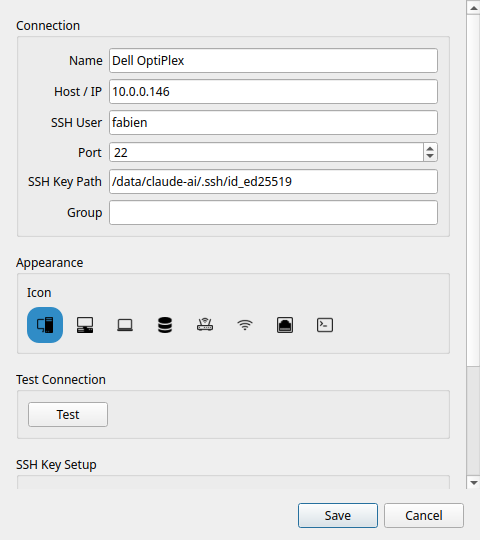
| Field | Description |
|---|---|
| Name | Display name shown in RemoteX (e.g. "Plex Server") |
| Host / IP | IP address or hostname of the server |
| SSH User | SSH username |
| Port | SSH port (default: 22) |
| SSH Key Path | Path to your private key file |
| Icon | Visual icon to identify this machine |
SSH key setup
If you don't have an SSH key pair yet, RemoteX can generate one and copy it to the server:
- Click Generate SSH key in the machine dialog
- Click Copy key to server — enter your password once (it is not stored)
- Future connections use the key automatically
Testing the connection
Click Test in the machine dialog. RemoteX runs echo remotex-ok on the remote host and reports success or the error message.
Assigning machines to a button
In the button editor, the Target machines section lists all your configured machines plus a Local option. Enable as many targets as you need.
Single machine
Enable one machine → the button runs the command on that machine directly, no extra click needed.
Multiple machines
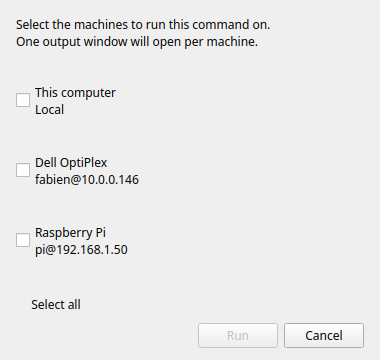
Enable two or more targets → a picker dialog appears each time you click the button, letting you choose which machine(s) to run on.
Local + remote
Enable Local alongside a machine → the picker includes your local computer as an option. Useful for scripts that work on both.
Output modes with SSH
All three output modes work over SSH:
| Mode | Behaviour |
|---|---|
| Silent | Result shown as a toast notification |
| Show output | Remote stdout/stderr shown in a dialog after the command finishes |
| Open in terminal | RemoteX generates an ssh -t command and opens it in your terminal emulator — full interactive session |
Run as user
In terminal mode you can fill in Run as user — RemoteX prepends sudo -u <user> on the remote command. Useful for running commands as a service account (e.g. www-data, postgres).