Update Your Server Without SSH-ing In
Keeping a home server updated is the chore everyone postpones: you have to SSH in, remember whether it's apt or dnf, run the update, maybe reboot. So it slips — and an un-updated server is the one that gets a security hole or breaks on the next big upgrade.
Commandeck turns "update the server" into a button you click from your desktop. The update runs over SSH on the server itself; you just watch the output.
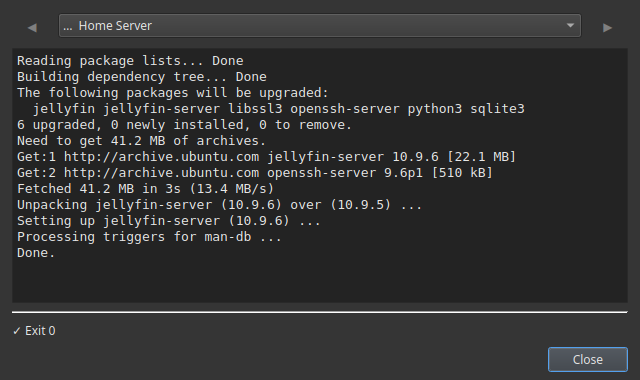
The update button
Pick the command that matches your server's Linux:
| Server type | Command |
|---|---|
| Ubuntu / Debian / Raspberry Pi OS | sudo apt update && sudo apt upgrade -y |
| Fedora / CentOS / Rocky | sudo dnf upgrade -y |
| Arch | sudo pacman -Syu --noconfirm |
| Docker stack | docker compose pull && docker compose up -d |
Create the button:
| Field | Value |
|---|---|
| Label | Update Server |
| Command | (from the table above) |
| Execution mode | Show output |
| Confirm before running | Enabled |
| Tooltip | Update all packages on the server |
Show output lets you watch the update happen and see what changed. Confirm before running gives you a "yes/no" before it starts.
A safe update routine, as three buttons
Updates go smoother as a little sequence. Make one button each:
Disk Space→df -h— make sure there's room before updating.Update Server→ the command above — run the upgrade.Reboot if needed→sudo systemctl reboot(Silent + Confirm, red) — only if the update asks for it.
Now updating is: click, click, done — no terminal, no trying to remember the exact commands.
This runs on the server, over SSH
The whole point is that you do this from your everyday desktop — Windows, Mac or Linux — while the commands run on the server. Add the server once; the button reaches it over SSH each time.
SSH is Pro
Running buttons on a remote machine is Commandeck Pro — $29 one-time, lifetime, 14-day free trial (no card). Updating this computer works on the free version.
Why it gets done now
- No friction = it actually happens. A button you can click in two seconds is a server that stays patched.
- You see the output — no blind updates; you watch what changed.
- A confirmation before anything runs, and a separate reboot button you control.
- Private — no account, no cloud, no telemetry. Straight from your desktop to your server.
Related: the Home Server Management guide builds the full maintenance grid. To check space first, see Check Disk Space on Your NAS.