Saved "Run as"
Pro feature
Saved "Run as" require Commandeck Pro.
🔰 In plain terms: a saved "Run as" (also called a profile) is a small set of "run conditions" you save once and reuse on many buttons — who runs the command (a different user) and where it runs (a folder). Instead of writing sudo -u www-data and cd /var/www in every button, you set them once and pick them on the button.
A profile holds no password. To act as another user, sudo asks for the password of the account you are connected with — so that password lives on the machine card (or in Preferences › This computer for this computer), and one profile works on every machine.
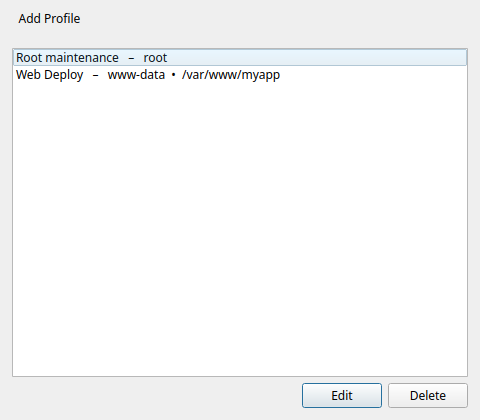
Creating a profile
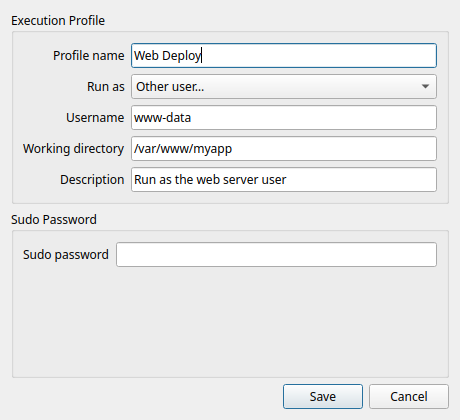
Open Menu ☰ → Saved "Run as" → Add Profile, then fill in:
| Field | What it does |
|---|---|
| Name | How the profile appears in the button editor's Run as list (as "Saved: …"). |
| Run as user | Run the command as this user instead of you (uses sudo -u <user>). Leave empty to run as yourself. |
| Working directory | The folder the command starts in (like running cd there first). |
| Description | Optional note to remind you what the profile is for. |
Using a profile on a button
In the button editor, pick your profile in the Run as list — it appears as Saved: name. The button now runs with that profile's user and folder — the command field stays clean, holding only the actual command.
Before / after
Instead of one button with sudo -u www-data bash -c 'cd /var/www/app && git pull', create:
- a profile Web Deploy → Run as user
www-data, Working directory/var/www/app - a button with command
git pull, profile Web Deploy
Cleaner, and the same profile is reusable for every web-app button.
Power off a remote machine — the classic case
Used over SSH (for example from your phone), the default Shutdown button fails with a message about needing authentication. The command is fine — powering off a machine needs administrator rights, and a remote connection doesn't get them automatically the way you do when you're sitting at the computer. (On your own desktop the same button just works.) Reboot is the same.
The fix is on the machine card, not in the button:
- if you connect with a password, leave Also the administrator (sudo) password ticked — nothing else to do;
- if you connect with an SSH key, type your password on that machine in Admin password.
When a button fails for lack of administrator rights, Commandeck runs it once more as administrator with that password — no profile, no change to the command. The same works for anything that needs admin rights on that machine — restarting a service, installing software, mounting a drive. Test on the machine card tells you whether administrator rights work.
⚙️ For sysadmins
- Run as user wraps the command with
sudo -u <user>. sudo authenticates the connected account, so Commandeck answers it with the machine card's admin password (or This computer's), fed over stdin (sudo -S) — never on the command line, and the command itself starts on an empty stdin. - A profile applies the same way locally and over SSH — the
sudo -u/ working-directory wrapping happens on whichever machine the button targets. - Profiles pair naturally with multi-machine buttons: one "deploy" profile, one button, several servers.
- An AI assistant can create and assign profiles for you via the MCP server — it decomposes a pasted shell one-liner into a profile + a clean command automatically.