Command variables
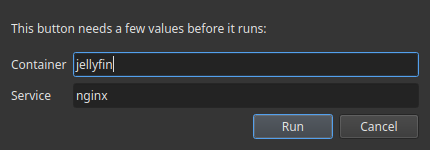
A button command can contain placeholders written as {{key}}. When you click the
button, Commandeck asks you for each value, fills it in, and then runs the command. The
value is used only for that run — it is never saved.
This keeps a shared pack generic (no personal data baked in): the pack ships
docker restart {{container}}, and each person types their own container name at run time.
How it works
- A command like
docker logs --tail {{lines}} {{container}}has two placeholders. - On click, a small window asks for Lines and Container.
- You type
50andjellyfin→ Commandeck runsdocker logs --tail 50 jellyfin. - Nothing is stored — next time it asks again.
Write a placeholder as {{key}} (letters, digits, underscore). Spaces inside are fine:
{{ container }} works too.
Standard variables
These keys have a friendly label and prompt built in. Reuse them so users get consistent questions. The list grows over time.
| Placeholder | Asks for | Effect on the command |
|---|---|---|
{{container}} |
Docker container name | replaces {{container}} before running |
{{service}} |
systemd service name | replaces {{service}} |
{{path}} |
a file or directory path | replaces {{path}} |
{{host}} |
a hostname or IP address | replaces {{host}} |
{{port}} |
a port number | replaces {{port}} |
{{branch}} |
a Git branch name | replaces {{branch}} |
{{package}} |
a package name | replaces {{package}} |
{{user}} |
a user name | replaces {{user}} |
{{pid}} |
a process ID | replaces {{pid}} |
{{lines}} |
a number of lines | replaces {{lines}} |
{{player}} |
a player name | replaces {{player}} |
{{message}} |
a message | replaces {{message}} |
Other variables (typed in the command)
You can still type any key directly in a command, e.g. {{region}}. If it isn't a
standard variable, Commandeck still asks for it at run time with a plain text box labelled
from the key name — so packs that use their own keys keep working.
Note: the Variable Values manager and the Insert variable picker only list the standard variables above — you can't create new variable keys from them. Custom keys live in the command text itself.
Saved values (faster, consistent)
You can save a list of values per variable in Menu → Variable Values (e.g. service →
jellyfin, sonarr). Then:
- When building a button, the Insert variable button (next to the Command field)
lets you either insert
{{service}}(asked each run) or pick a saved value to freeze it into the command now. - At run time, a variable that has saved values shows a dropdown of them — and you can still type any other value by hand.
Don't put secrets in a command
Never write a real password or API key in a command. If a command needs one, use a
placeholder (e.g. {{token}}) so it's typed at run time and never stored or shared in a
pack. Pack submissions that embed a literal secret are rejected automatically.