Use Case: Drive Commandeck from a local AI
Pro feature
AI integration (MCP) requires Commandeck Pro.
🔰 The idea: instead of building buttons by hand, you ask an AI assistant — "add a button that restarts Nginx in the Server category" — and it creates it for you. The AI can read your buttons, machines and profiles, and (if you allow it) run them. It works with cloud assistants like Claude and with a fully local model running on your own hardware.
This page walks the local-model path end to end with Open WebUI + a local LLM (e.g. Llama, Gemma). For the full client matrix and options, see the AI Integration reference.
Why local?
A local model keeps everything on your machine — your buttons, commands, and server names never leave your network. Great for homelabs and privacy-conscious setups.
Step by step
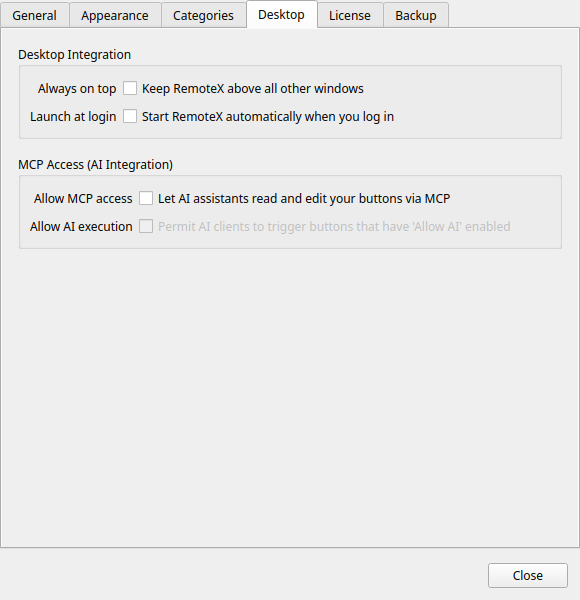
1. Turn on MCP access
Preferences → Desktop Integration → Allow MCP access.
2. Launch the Commandeck MCP server
The server is built into the app. Run your Commandeck build with --mcp-server:
/path/to/Commandeck-Pro-VERSION-Linux-x86_64.AppImage --mcp-server
Run it as the user who uses Commandeck
The server reads the buttons of whoever launches it. Launch it from a terminal logged in as your normal desktop user, or the AI will see the wrong (or empty) set of buttons.
3. Bridge to Open WebUI with mcpo
Open WebUI talks to tools over HTTP, so put the mcpo proxy in front:
mcpo --port 8000 -- /path/to/Commandeck-Pro-VERSION-Linux-x86_64.AppImage --mcp-server
Then in Open WebUI: Admin Panel → Settings → Tools → +, type OpenAPI, URL http://<machine-ip>:8000. If Open WebUI runs on a different box, use the IP of the machine running mcpo — not localhost.
4. Talk to your buttons
Start a chat, enable the commandeck tool, paste the recommended system prompt, and try:
"List my buttons." "Add a button called 'Disk Usage' that runs
df -hin the System category."
Press F5 in Commandeck (or menu → Refresh Buttons) to reload the grid and see the new buttons appear — no restart needed.
⚙️ Notes for power users
- Model matters. The tool layer is model-independent, but tool-calling quality varies a lot. Instruction-tuned models work best; small local models often need the system prompt to call tools reliably.
- Letting the AI run buttons is a separate, three-gate opt-in (global toggle + per-button flag + optional confirmation). Off by default. See Allowing AI to run buttons.
- Persisting the bridge: a systemd user service keeps mcpo running across reboots — see the MCP reference.