Use Case: Manage a homelab fleet
Pro feature
SSH machines, multi-machine buttons and saved "Run as" require Commandeck Pro.
🔰 The goal: you run a few machines at home — a NAS, a Raspberry Pi, a small server — and you keep typing the same SSH commands to check on them. With Commandeck you build the buttons once and click them from one window. This page ties together the pieces: machines, multi-machine buttons, and profiles.
1. Add your machines
Menu ☰ → Manage Machines → Add. Give each one a name, host, user, and SSH key.
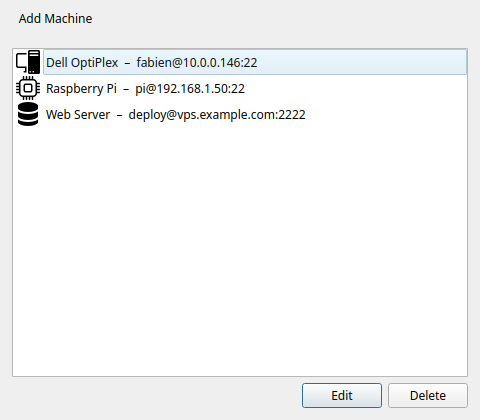
On first connect, Commandeck shows the host's fingerprint and asks you to confirm it (see Security) — no need to pre-seed known_hosts from a terminal.
2. One button, several servers
In the button editor, under Target machines, enable more than one machine (optionally including Local). The button becomes a multi-machine button: each click opens the picker so you choose where to run it.
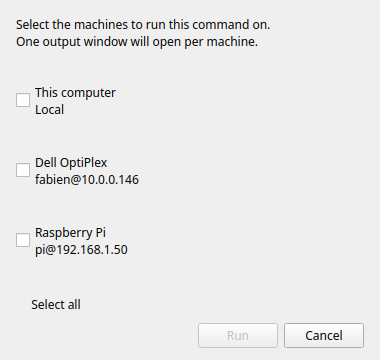
Health-check button
Command uptime && df -h, with your NAS, Pi, and server all enabled. One button answers "how is each box doing?" — pick the target each time.
3. Reuse run-conditions with profiles
If several buttons need the same service account or working directory, save a "Run as" once and attach it — e.g. a Deploy profile (run as www-data, working dir /var/www/app) used by every web button.
4. Organise by category
Group buttons into categories like NAS, Pi, Docker so the grid stays readable. Pick a category from the header dropdown to filter.
⚙️ For sysadmins
- Parallel vs sequential: a multi-machine button runs on one machine per click (via the picker). For the identical command on every server at once, either click through the picker per host, or keep a button per machine in a category.
- Mixed OS fleet: today a button holds one command. If a target runs a different OS than the command expects (PowerShell vs bash), it may not run — keep OS-specific buttons separate for now.
- Automate it with AI: point a local model at Commandeck via MCP and ask it to create machines, profiles and buttons for your whole fleet in one go.